Delete a User
This document will describe how an admin can delete a user. If a user needs to be removed from access to a dealership, please refer to the Remove User Dealership Access document.
Only an admin can delete a user!
Ensure the selected dealership is the correct dealership that the existing user should be deleted.

Navigate to the Administration section on the TimeAi dashboard by clicking the Administration icon at the top right of the page.

Click the 'USER MANAGEMENT' tile. The 'Dealership Users' tab will be selected and will show the current users that have access to the selected dealership.

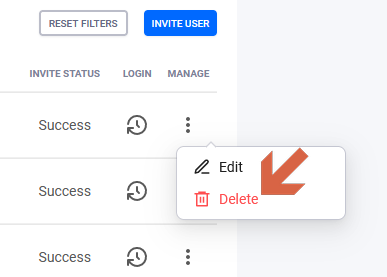
Look through the list of users and find the user that needs to be deleted from the TimeAi system. Click the three dots in the last 'MANAGE' column on the right of the user's row. Then click 'Delete'.
A confirmation dialog will be shown.

Click 'Yes'.
The user will be 'soft-deleted'. The soft-delete period will last for 15 days. During this time period, the user can be restored. If the user needs to be restored, please refer to the Restore a Deleted User document.