Export & Share a Report
This document will describe how to generate a report. The report can be export & share externally or downloaded to the user's compueter.
TimeAi Dashboard & Pages
Navigate to the TimeAi dashboard. From here, the user can choose any page in the Heat Sheet, Service Advisor Performance, Technician Performance, etc. A report can be generated then exported or shared within any page or pop-up window within TimeAi that has these buttons.
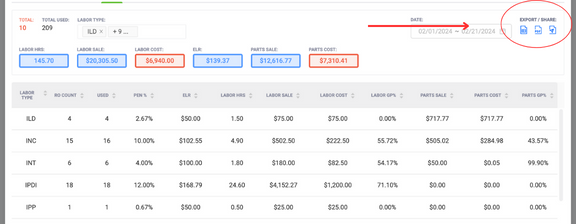
Export & Share
Within the Export & Share section of any given page, the user can choose to download an Excel spreadsheet, a PDF, or share either of the formats via email or SMS (text messaging - mobile).
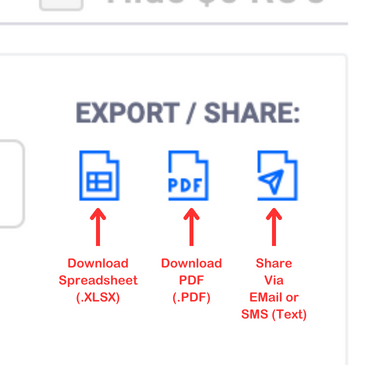
When choosing the Export options to download a PDF or spreadsheet (.xlsx), the browser will download the file to the user's default 'Downloads' folder or the folder that they have previously designated for downloads.
Share via Email or SMS Text Messaging
Once the Share window is open, choosing between email and text is available, as well as sending a PDF copy or Spreadsheet (.xlsx).
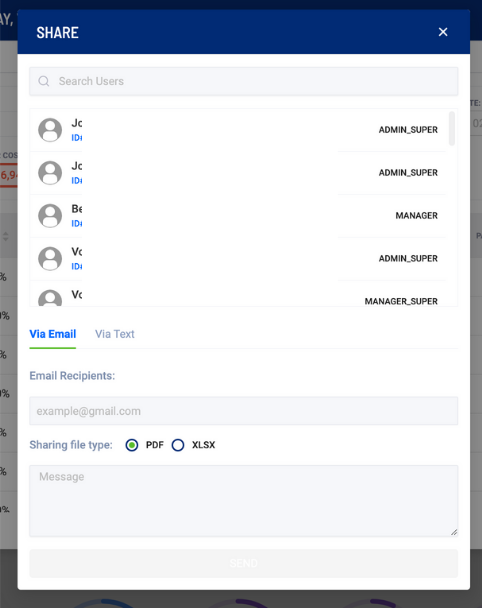
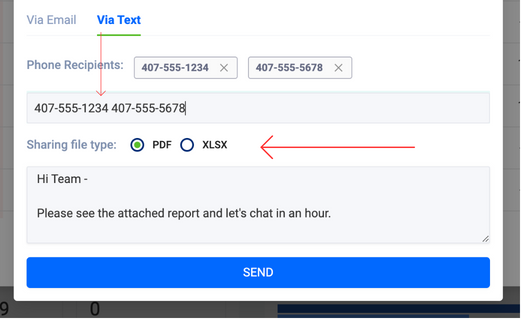
From this Share window, the user can choose either the 'Via Email' or 'Via Text' tab. Once selected, enter in the proper email address or mobile number to send the file, and an optional message. Multiple emails or mobile numbers can be entered, simply by adding a space between the entries.
This example shows examples of sending a PDF report to multiple email recipients.
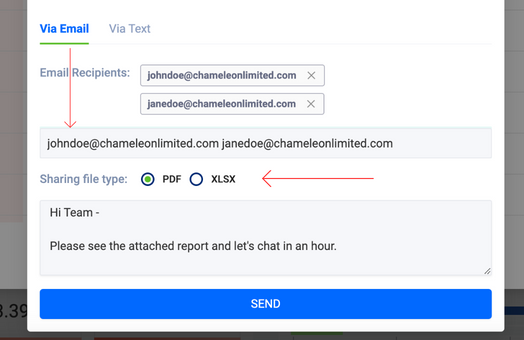
This example shows examples of sending a PDF report to multiple SMS recipients.
After clicking 'Send', the report will be sent to its intended recipient(s).