Technician Shops
This document will describe the technician shops shown on the TimeAi Service dashboard.
Default Shops
There are two default shops that are created when a dealership is onboarded to TimeAi.
- Main
- Express
They are shown in the Technician Performance section at the bottom of the Service dashboard. There is also a pseudo 'Total' shop that combines all the technicians and their data to see at a holistic level.
The default shop and total are shaded in a blue color.
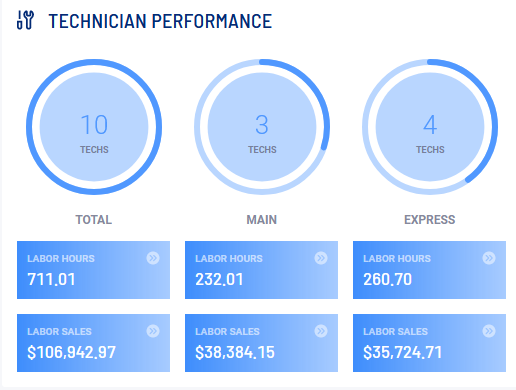
The default shops cannot be deleted or renamed.
Custom Shops
Custom technician shops can be added for customization and better isolation of the performance of a group of technicians in a similar role. Custom shops can be added in the Administration section. The guide for creating custom shops can be found here.
Once a custom shop has been created, it will show up to the right of the default shops on the Service dashboard in a purple shading.
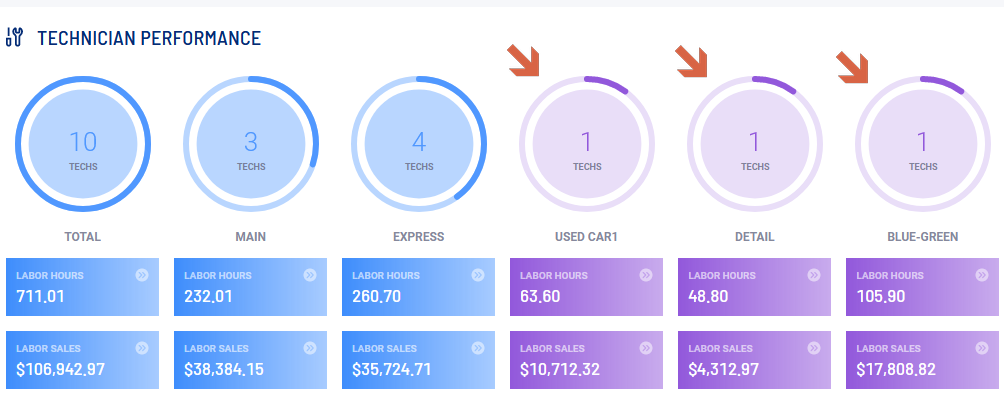
A maximum of 4 custom shops can be created.